Posts

Showing posts with the label task sequence

SCCM 2012 R2 "Machine does not meet OSD capture requirements. Capture cannot continue."
Image
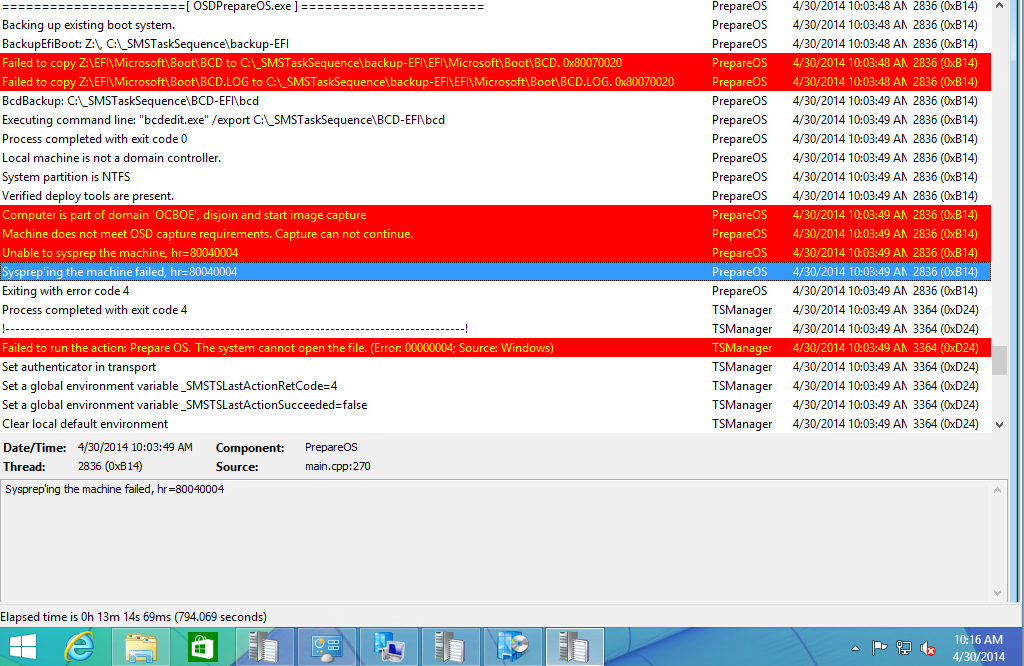
During a "Build and Capture" task sequence you may run into this error. I ran into this error a few times before and I always had to refer back to my older task sequences to figure it out. It's a very simple fix, but I seem to overlook it every time. You will see this in your SMSTS.log: This means that the computer is a part of a domain. You can't capture a machine if it's part of a domain. My task sequence was like this: As you can see this is a very simple task sequence. It just captures my built machine and stores it on my distribution point. I don't like the "Build and Capture" style task sequence. This way offers me far more flexibility in my opinion. It's just far less automated. To fix the issue you need to simply add a 'Join Domain or Workgroup' step before everything else. So your task sequence will look like this: The next screenshot shows a successful join to the workgoup.       The next screenshot ...

SCCM 2012 / ADK Use Loadstate Manually

Image
In the past posts I have explained how to create a task sequence to update / refresh computers to Windows 7 from Windows XP.  Most of the time this all works fine and I can just sit back and watch as the computers refresh themselves. Sometimes, though, that is not always the case as I will explain. Sometimes my task sequences will fail at the 'Restore User Files and Settings' group. It usually happens on laptops. From what I have seen it's because the laptops have went into hibernation, powered down, or have lost network connectivity at this step. What this means is that the State Store has been saved to the State Migration Point, but the data is encrypted and you can't really do anything with it. You have a bare metal Windows 7 install with no user data. I've read a few ways to accomplish retrieving your data from the State Store, and I'll cover them here. Use MigRecover found  here . This method did not work for me at all . I tried both versions to no a...

SCCM 2012 USMT (Request State Store) Max Client Error E_SMPERROR_MAX_CLIENT_LIMIT

Image
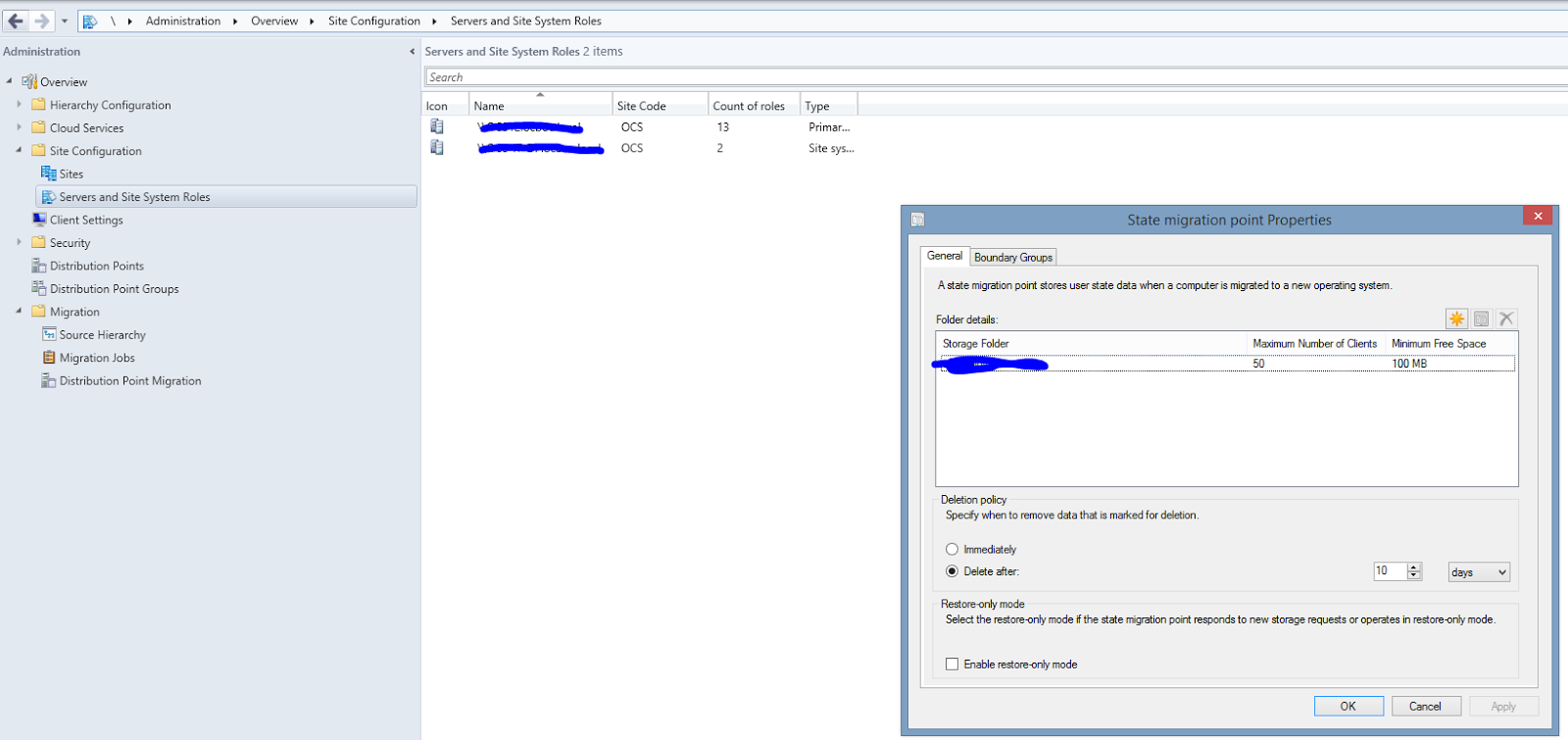
I've came across this error a couple of times now. If you're receiving this error you will see it 3-4 times in your SMSTS.log file before your task sequence will fail. Giving you a generic task sequence error. Unless you look in the SMSTS.log you will not see this error. After looking through my settings on my State Migration Point, I noticed that I had only 15 clients with Complete/In-Progress status. Well that should be fine as I have set my client max to 50. The catch is the days I had set to retain my migration data. This was set to 30 days. This is pretty high , I know. I had it set this high because the is a new rollout and I didn't want to lose anyone's data. I wanted to have plenty of time to recover it if I needed to. So even though my clients max was set to 50 and the SCCM console was only showing 15 Completed/In-progress. My Migration Point had the meta data for over 100 still stored. This was caused by me just deleting associations out of the console and...

SCCM 2012 R2 Windows XP refresh to Windows 7 Part 2

Image
Part 2 of my post of how I made our transition to Windows 7 from XP please read my previous post or this one won't make much sense. http://zemerickit.blogspot.com/2014/04/sccm-2012-r2-windows-xp-refresh-to.html So we've created a task sequence and most of the pieces are in place for the successful deployment of Windows 7. However in my case I needed to deploy to laptops that only had WIFI access. In all the forums I read everyone says just don't do it. Well-- I'm going to do it. I have the bandwidth available and I don't want to have to touch every single computer to plug them up and image them. So my task sequence looks something like this:      The first thing I had to do was to make sure all the content I needed was downloaded to the machine prior to the task sequence starting. This is a simple option to select when you deploy the task sequence under the Distribution page (or tab) select "Download all content locally before starting task seq...

SCCM 2012 R2 Windows XP refresh to Windows 7

Image
As the deadline for the End of Life of Windows XP approaches I was tasked with the job to make the upgrade to Windows 7  happen in the simplest manner possible. Here is my story. My first objective was how: 1. You could make two task sequences. One to capture user data and the second to deploy the OS and restore the data. This made no sense to me so I didn't go this route. I mean there had to be a better way. 2. You could make one task sequence that captured the user data deployed the OS and restored the data all in one sequence. This is a completely unattended approach and that's the way I like it. You need a few things to get started. 1. You need Windows AIK for Windows 7 and the supplement which can be found at the following links. Windows 7 AIK http://www.microsoft.com/en-us/download/details.aspx?id=5753 Windows 7 AIK Supplement http://www.microsoft.com/en-us/download/details.aspx?id=5188 *Later on you'll need the Windows 8 AIK as well. The links are refer...